(리눅스) apt-get을 통해 yum 설치하기
1. vi 편집기를 열어 제일 아래 줄에 다음 코드를 추가해준다.
$ vi /etc/apt/sources.list

deb http://archive.ubuntu.com/ubuntu bionic main restricted universe multiverse
deb http://archive.ubuntu.com/ubuntu bionic-security main restricted universe multiverse
deb http://archive.ubuntu.com/ubuntu bionic-updates main restricted universe multiverse
2. 편집기 종료 후 설치 가능 리스트를 업데이트 해준다.
$ apt-get updage
※ apt-get upgrade 와의 차이
- apt-get upgrade : apt-get 으로 설치한 패키지들을 최신 버전으로 업그레이드 해준다.
- apt-get update : 설치 가능한 리스트들을 업데이트 해준다.
3. 추가로 해당 패키지들을 설치해준다 (* 순서대로 설치를 해야함)
$ sudo apt install python-lzma
$ sudo apt install python-sqlitecachec
$ sudo apt install python-pycurl
$ sudo apt install python-urlgrabber
4. 모두 설치되었다면 yum 설치 시작.
$ sudo apt install yum
※ yum 설치 시, there are no enable repos 에러가 나올 경우 해결 방법
[ 원인 ]
: repolist에 아무 것도 없어서 생기는 에러.
[ 해결 방법 ]
1. 해당 경로로 이동
$ cd /etc/yum/repos.d
2. 새 파일 생성 후 vi 편집기로 실행
$ vi daum.repo
3. 해당 코드를 입력 후 저장.
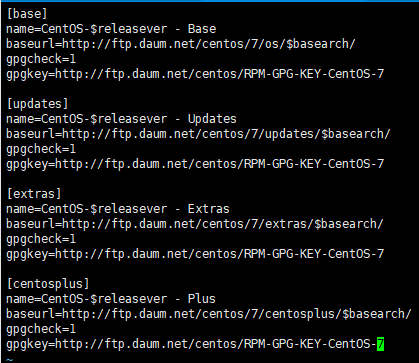
[base]
name=CentOS-$releasever - Base
baseurl=http://ftp.daum.net/centos/7/os/$basearch/
gpgcheck=1
gpgkey=http://ftp.daum.net/centos/RPM-GPG-KEY-CentOS-7
[updates]
name=CentOS-$releasever - Updates
baseurl=http://ftp.daum.net/centos/7/updates/$basearch/
gpgcheck=1
gpgkey=http://ftp.daum.net/centos/RPM-GPG-KEY-CentOS-7
[extras]
name=CentOS-$releasever - Extras
baseurl=http://ftp.daum.net/centos/7/extras/$basearch/
gpgcheck=1
gpgkey=http://ftp.daum.net/centos/RPM-GPG-KEY-CentOS-7
[centosplus]
name=CentOS-$releasever - Plus
baseurl=http://ftp.daum.net/centos/7/centosplus/$basearch/
gpgcheck=1
gpgkey=http://ftp.daum.net/centos/RPM-GPG-KEY-CentOS-7
4. yum 업데이트를 실행해준다.
$ yum update